
Sweet 16 seating chart
A Sweet 16 seating chart as fun as the party
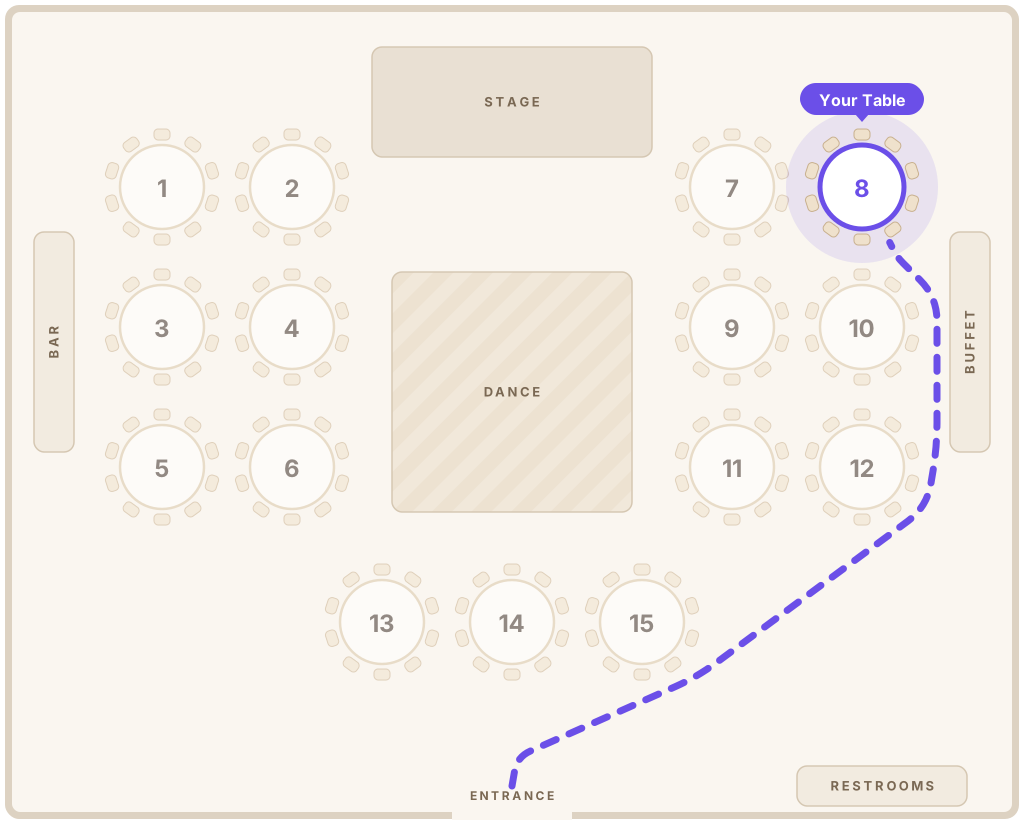
Draw the venue, seat her friends, the court and the whole family, then share one QR code. Guests scan, type their name and see their table on the map in seconds.
- Friends and family, seated right
- Guest page in 6 languages
- One-time Event Pass, no subscription

Welcome, Sofía!
Table 8
Lopez Family
Why Sweet 16s are different
Two parties in one room: her friends and the family
Teens want to be together near the music; grandparents want to hear each other. A good seating chart gives both.
Her friends sit together
Group school friends, teammates and cousins at tables close to the dance floor, so the energy stays up all night.
Family in a calmer spot
Seat parents, grandparents and family friends a little away from the speakers, with an easy path to the entrance.
A court and a candle ceremony
Give the birthday girl and her court their own table. Seat the 16 people in her candle ceremony where they can get up easily.
Easy for every age
Teens scan a QR code without thinking twice. Grandparents get the page in their own language with one tap.
How it works
From guest list to QR code in one evening
- 1
Draw the venue
Add round and long tables, the dance floor, DJ booth, photo booth and cake table.
- 2
Import the guest list
Upload your spreadsheet or paste names. Seatella keeps families and friend groups together.
- 3
Seat everyone
Drag guests onto tables or auto-seat by group in one click, then fine-tune.
- 4
Print the QR sign
Print a sign that matches her colors. Guests scan it at the door and walk straight to their seat.
Designs
Designs that feel like her
Blush roses, starry nights, tropical or modern: pick a design and her colors. The guest page and printed sign match.


Find your Seat
Ana & Luis


Find your Seat
Ana & Luis



Find your Seat
Ana & Luis

Find your Seat
Ana & Luis
Seating tips
Sweet 16 seating tips
Simple rules that keep both the teens and the grown-ups happy.
- 1
Start with the birthday table
Place her table first, facing the room and close to the dance floor. Everything else is arranged around it.
- 2
Friends near the music
Put her friends’ tables between her table and the dance floor. They will spend most of the night there anyway.
- 3
Keep friend groups whole
School, team and neighborhood friends each want their own table. Mixing groups works best with a few connectors.
- 4
Grandparents away from the speakers
Seat older guests farther from the DJ, with good sight of the cake and the candle ceremony.
- 5
Parents with a view
Parents and godparents like a table where they can see the floor and keep an eye on everything.
- 6
Leave room for plus-ones
Teens often bring a friend at the last minute. Keep a seat or two free and add them in seconds.
FAQ
Sweet 16 seating chart questions
How do I make a seating chart for a Sweet 16?
Start with the venue’s floor plan and place the birthday girl’s table first. Seat her friends nearby, close to the dance floor, and give family their own tables a little farther from the music. Seatella lets you do it all online and share it with one QR code.
Who sits at the Sweet 16 head table?
Usually the birthday girl with her closest friends or her court. Some families seat the parents there too; others give them the table right next to it.
Can I import the guest list from a spreadsheet?
Yes. Upload an Excel or CSV file, or paste a list of names. Seatella reads party sizes and keeps groups together.
How much does a Sweet 16 seating chart cost?
Building the floor plan, guest list and seating is free. To share it, a one-time Event Pass is $39 for unlimited guests, with no subscription.
Do guests need an app?
No. Guests scan the QR code with their phone camera and the page opens in the browser. No app and no account.
Make her night easier for every guest
Build your Sweet 16 seating chart for free. Pay once when you’re ready to share it.