
For banquet halls & event venues
Seating chart software built for banquet halls
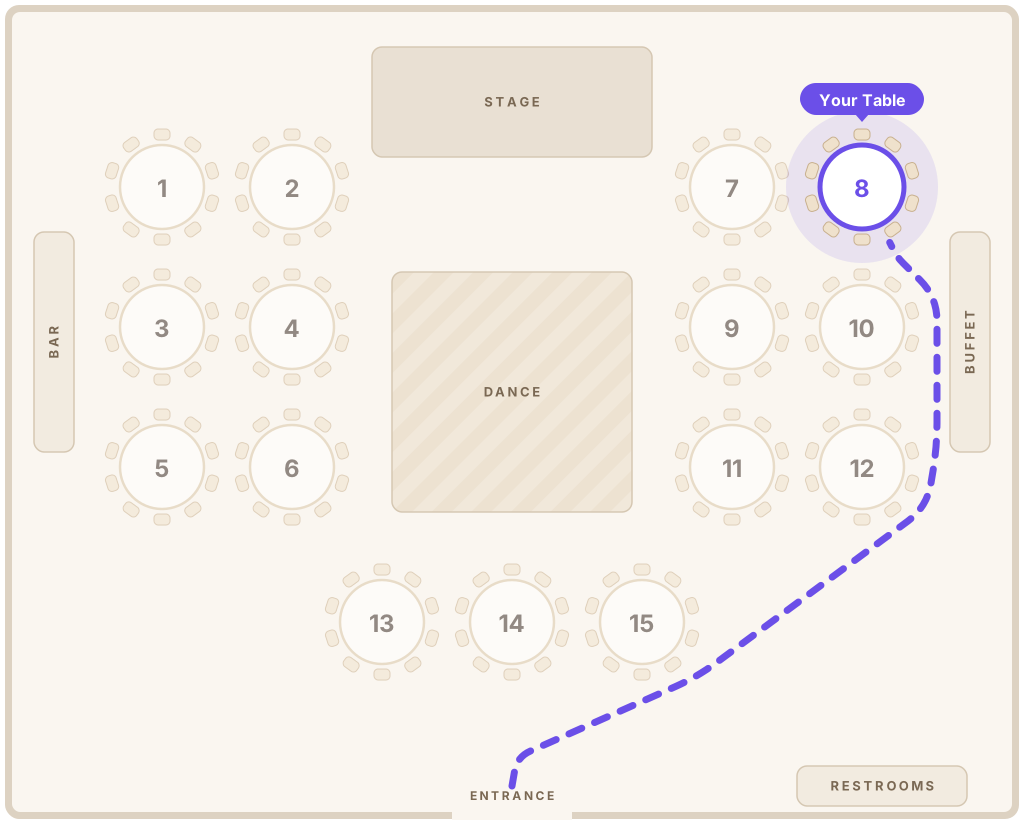
Save your room layouts once and reuse them for every wedding, quince and gala. Each event gets a QR code guest page with your logo, so guests find their table without stopping at the door.
- Reusable room layouts
- Your logo on every guest page
- Live stats on event night

Welcome, Maria!
Table 8
Lopez Family
Why venues use it
Fewer questions at the door, smoother nights for your staff
Your coordinators shouldn’t spend the first hour of every event pointing guests to their tables.
Your rooms, saved once
Draw each hall with its real tables, dance floor, stage and bar. Start every new event from a saved layout instead of a blank page.
Your brand on every event
Guest pages show your logo and colors. On the Venue plan the Seatella name disappears completely.
Know what’s happening on event night
See how many guests scanned, the busiest moments and any name that wasn’t found, so staff can fix it while the guest is still at the door.
Every guest, every language
The guest page opens in each guest’s phone language: English, Spanish, Portuguese, French, Italian or Haitian Creole.
How it works
Set up your venue once, then every event takes minutes
- 1
Save your halls
Draw each room with its tables and features, then save it as a venue layout for future events.
- 2
Create the event
Pick the hall and layout, then import the client’s guest list from Excel or Google Sheets.
- 3
Seat the guests
Drag families onto tables or auto-seat them by group in one click. Changes are live instantly.
- 4
Print the QR sign
Place a branded QR sign at the entrance. Guests scan it and walk straight to their table.
Designs
A design for every kind of event you host
Elegant galas, garden weddings, tropical parties and modern celebrations. The guest page and printed sign match.

Find your Seat
Ana & Luis

Find your Seat
Ana & Luis


Find your Seat
Ana & Luis



Find your Seat
Ana & Luis
Event night tips
Event night tips for venue coordinators
Small details that make the guest arrival go smoothly.
- 1
Put the QR sign where guests pause
At eye level by the entrance or the cocktail area, where guests naturally stop. A second sign helps in large halls.
- 2
Test the scan on your Wi-Fi
Scan the sign from the entrance before doors open. The guest page is light and loads quickly, even on busy venue Wi-Fi.
- 3
Watch the “not found” list
During arrivals, check which names guests couldn’t find. It usually means a misspelling you can fix in seconds.
- 4
Keep one printed backup
A short alphabetical list at the welcome table covers the rare guest without a phone.
- 5
Update the layout when tables move
If you add or remove tables on the day, change the map too, so the directions guests see stay accurate.
- 6
Reuse what works
When a setup works well for a room, save it as a venue layout and start the next event from it.
FAQ
Questions from venues
How much does Seatella cost for a venue?
The Venue plan is $79 a month (or $790 a year) for unlimited events, guests, halls and layouts, with your logo and no Seatella branding. Smaller venues can start on Pro at $29 a month for up to 5 live events at a time.
Can I save the layouts of my different halls?
Yes. Draw each room once and save it as a venue layout. When you create an event, pick the hall and layout and it’s copied in, ready to adjust.
Will guests see our venue’s brand?
Yes. On Pro and Venue, guest pages and the dashboard use your logo and colors. The Venue plan also removes “Powered by Seatella”.
What can we see during an event?
The event’s Stats page shows how many guests opened the page, how many came from the QR code, the busiest 15 minutes, and the names guests typed that weren’t found. It refreshes every 30 seconds while the event is live.
Do guests need an app or an account?
No. Guests scan the QR code with their phone camera and the page opens in the browser. They only type their name.
Is guest information private?
Yes. Guest pages are never listed on Google, guests can only find their own table by name, and no advertising trackers run on them.
Give every event at your venue a smoother arrival
Set up your halls for free and try it on your next event.