
Wedding seating chart
A wedding seating chart your guests can find in seconds
Draw your reception, seat both families, the wedding party and every plus-one, then share one QR code. Guests scan, type their name and see their table on the map. No easel to crowd around.
- Couples, families and plus-ones
- Guest page in 6 languages
- One-time Event Pass, no subscription

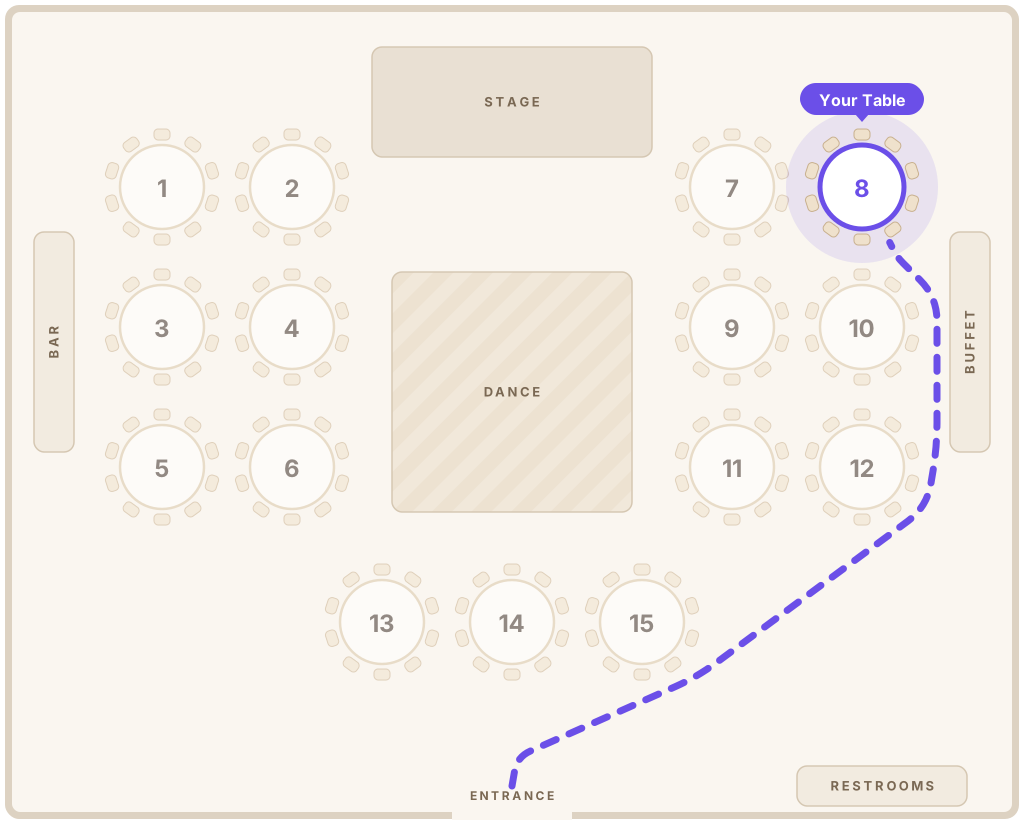
Welcome, Maria!
Table 8
Lopez Family
Why go digital
The seating chart is the last thing to change before the wedding
RSVPs arrive late, plus-ones appear and a table needs one more chair. Seatella keeps up until the doors open.
No crowd at the seating board
Instead of 150 guests squinting at one poster, everyone scans the QR code and finds their table on their own phone.
Change it the morning of
Move a cousin to another table at 9 AM. The guest page updates instantly, and the printed QR sign never needs reprinting.
Couples and plus-ones sit together
Add “Michael Ortiz +1” as one entry. Seatella seats them side by side and counts every chair.
Both families, every language
The guest page opens in each guest’s phone language: English, Spanish, Portuguese, French, Italian or Haitian Creole.
How it works
From RSVP list to QR code in an evening
- 1
Draw your reception
Add round and long tables, the sweetheart or head table, dance floor, bar, DJ and cake table.
- 2
Import your guest list
Upload the RSVP sheet from Excel or Google Sheets. Seatella reads plus-ones and leaves out anyone who declined.
- 3
Seat everyone
Drag guests onto tables, or auto-seat by family and friend group in one click, then fine-tune.
- 4
Print your QR sign
Print a welcome sign in your wedding’s design. Guests scan it at the entrance and walk straight to their seat.
Designs
Designs that match your wedding
Garden greenery, blush roses, art deco gold or modern ivory arches. The guest page and printed sign match your colors.

Find your Seat
Ana & Luis


Find your Seat
Ana & Luis


Find your Seat
Ana & Luis


Find your Seat
Ana & Luis
Seating tips
Wedding seating chart tips that keep everyone happy
Simple rules wedding planners use, from the head table to the last plus-one.
- 1
Place the couple first
Decide between a sweetheart table and a head table with the wedding party, then center it where everyone can see the toasts.
- 2
Parents and grandparents up front
Seat immediate family at the tables closest to the couple, with grandparents a little away from the speakers.
- 3
Handle divorced parents with care
Give each parent their own family table at an equal distance from the couple. Nobody should feel seated in the back.
- 4
Group by how guests know you
College friends, coworkers, the family from out of town: guests relax faster when they share a story with their tablemates.
- 5
Plus-ones sit with their partner
Always seat couples together, and put guests who don’t know many people next to someone friendly and outgoing.
- 6
Leave room for late changes
Keep a spare seat at a few tables. With a digital chart, a last-minute guest takes seconds to add.
FAQ
Wedding seating chart questions
How do I make a wedding seating chart?
Start with your reception floor plan, place the head or sweetheart table first, then seat immediate family nearby and group the rest by how they know you. Seatella lets you draw the room, import your RSVP list, seat everyone online and share it with one QR code.
When should I finish the wedding seating chart?
Most couples finish about one to two weeks before the wedding, once RSVPs are in. With a digital chart you can keep making changes until the day itself, and the QR sign stays the same.
Do I still need a printed seating board?
No. A single printed QR sign at the entrance is enough: guests scan it and see their table on the map. Many couples keep a small printed list at the welcome table as a backup.
Can I import our RSVP list from a spreadsheet?
Yes. Upload an Excel or CSV file, including RSVP and party-size columns. Seatella keeps couples and families together and skips guests who declined.
How much does a wedding seating chart cost?
Building the floor plan, guest list and seating is free. To share it, a one-time Event Pass is $39 for unlimited guests, with no subscription.
Do guests need an app?
No. Guests scan the QR code with their phone camera and the page opens in the browser. No app and no account.
One less thing to worry about on your wedding day
Build your wedding seating chart for free. Pay once when you’re ready to share it.